A Calendly alternative for picking a group date
Most people who search for Calendly alternatives are not unhappy with Calendly. They tried to use it for something it was not built to do: get nine people to agree on which Saturday. Calendly's core object is a booking link pointed at one person's calendar, and the invitee's job is to take a slot that calendar says is open. When the question is "which day works for all of us", nobody's calendar is the authority, and there is no single host whose free time decides the answer.
This page is for that second case. We walked calendly.com in August 2026, read its pricing page and its Meeting Polls page, and declined the optional cookies on the way in (the consent dialog asks to cover "clicks, cursor movement and screen recordings" along with marketing). Everything below about Calendly comes from that session. If you want a booking link, keep reading only to the section where we say Calendly is the better tool, then go get one.
What Calendly is built around
The homepage headline in August 2026 is "All the work around meetings, handled", and the first product tab is Scheduling. You connect a calendar, define an event type with a name, a location, and a duration, publish the link, and other people book against your availability. The pricing page states the commercial model in a tooltip on the word "seat": "Seats are required for users to connect calendars and host Calendly meetings - meeting invitees do not require a seat." The person being booked pays. The person booking never signs up.
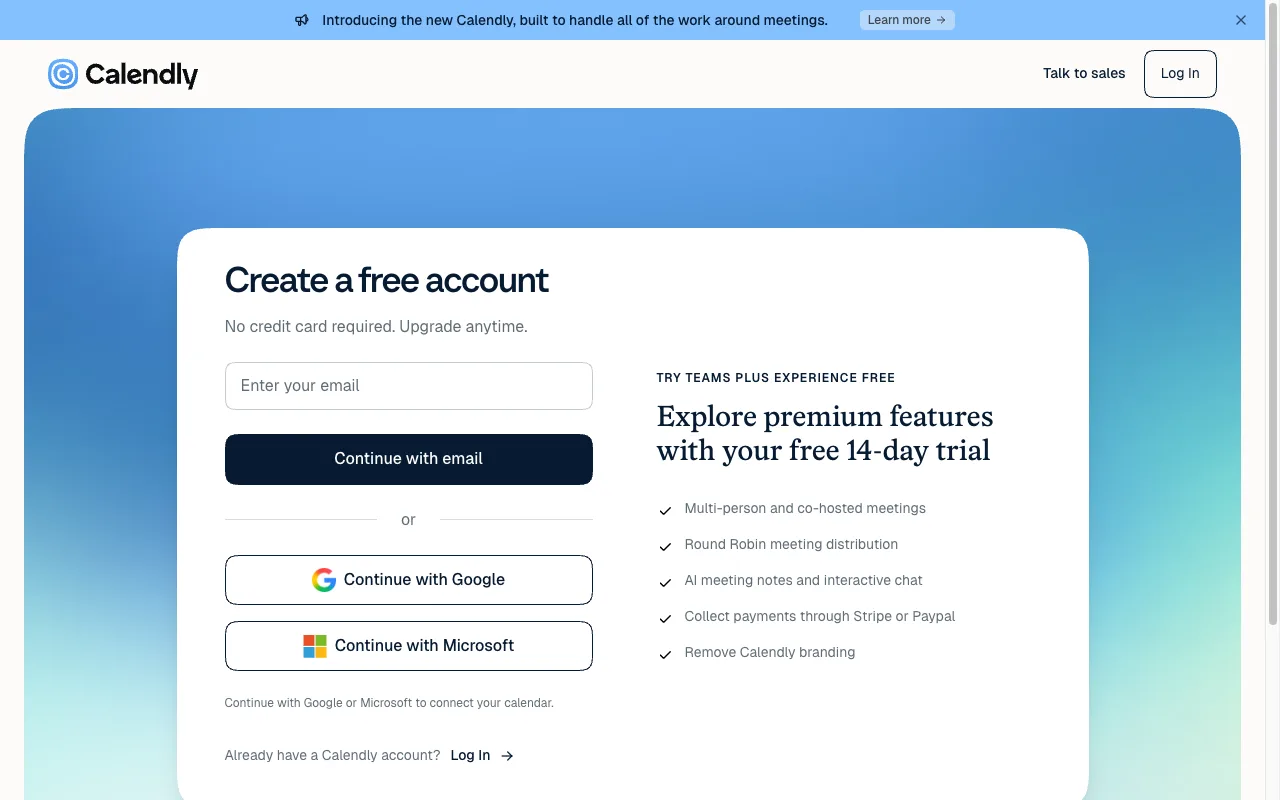
Nothing on calendly.com lets you skip the first half of that. The signup page is titled "Create a free account", offers an email field or Continue with Google and Continue with Microsoft, and notes underneath that Google or Microsoft are the way "to connect your calendar". Beside the form sits a 14-day Teams Plus trial listing multi-person and co-hosted meetings, round robin distribution, AI meeting notes, Stripe and PayPal payments, and Calendly branding removal. A host account is step zero, before any link exists.
What the free plan covers
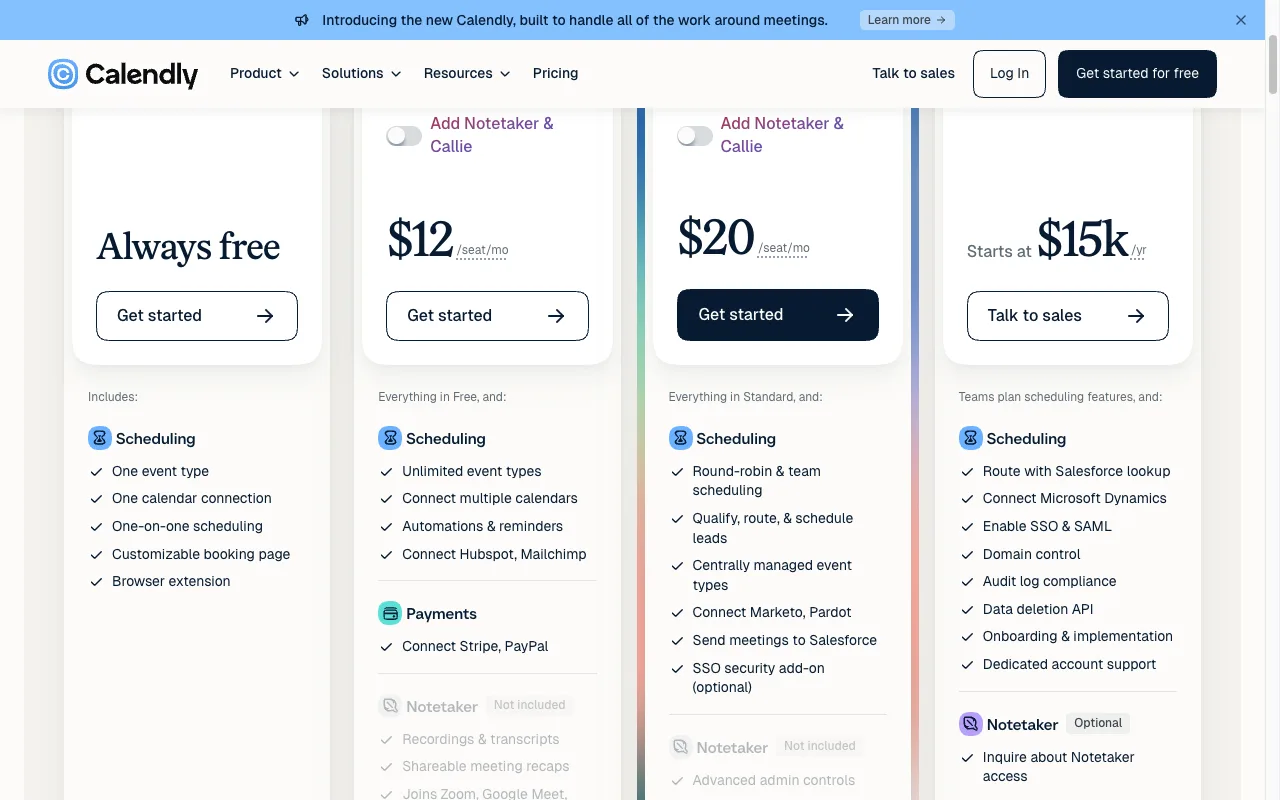
The Free plan card says "Always free" and lists exactly five things: one event type, one calendar connection, one-on-one scheduling, a customizable booking page, and the browser extension. The Compare features table underneath draws the lines more sharply. One calendar connection on Free against six on every paid tier. Unlimited one-on-one meetings on all four tiers. A dash in the Free column for multi-person meeting types, for booking on behalf of others, and for automated meeting reminders.
Paid pricing, read with the monthly toggle on: Standard is $12 per seat per month, or $10 per seat per month billed yearly, and adds unlimited event types, multiple calendars, reminders, and Stripe or PayPal payments. Teams is $20 per seat per month, or $16 billed yearly, and adds round robin, routing, and Salesforce. Enterprise starts at $15,000 a year, and its tooltip notes a 50-seat minimum in USD only.
Calendly has polls, and they cost nothing
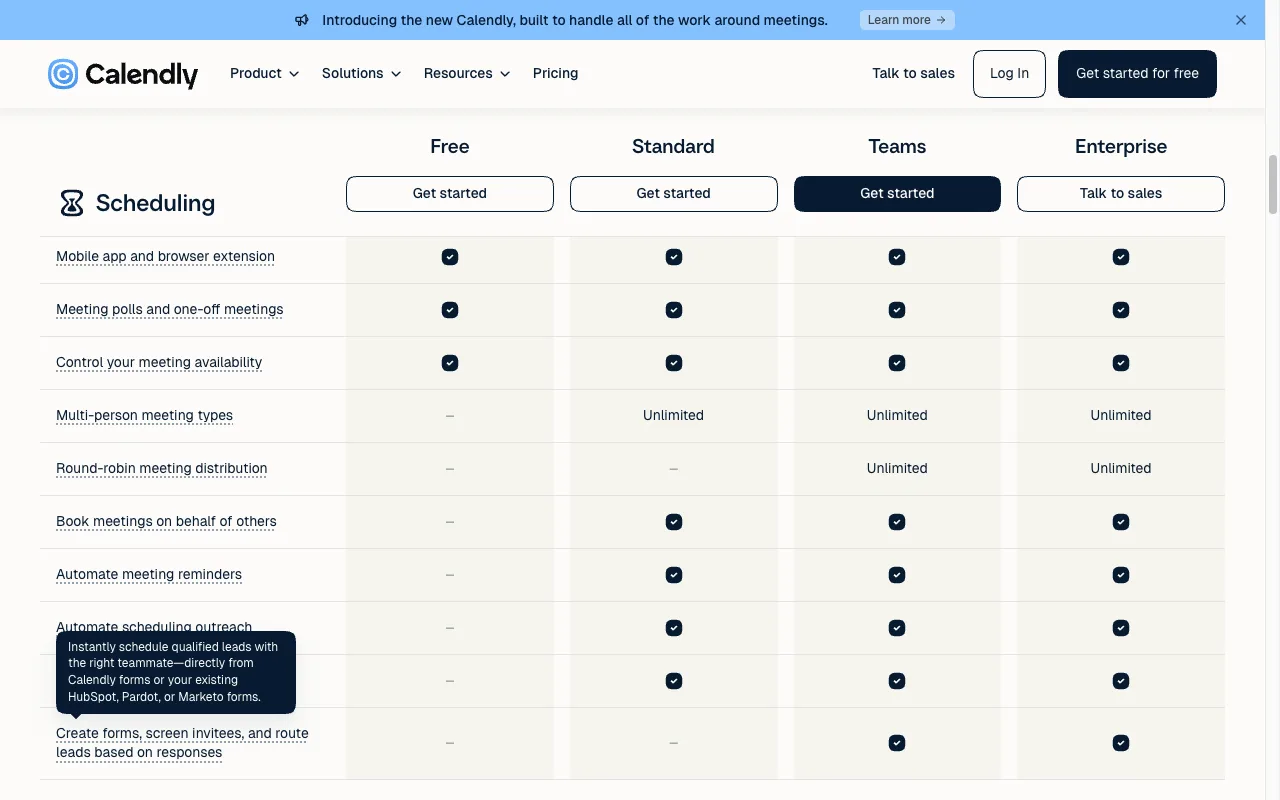
We expected to find Meeting Polls sitting behind Standard. They are not. In the Compare features table the row "Meeting polls and one-off meetings" is checked in all four columns, Free included, and Calendly's own FAQ on the Meeting Polls page answers the question directly: "Yes! Every Calendly plan includes access to the scheduling poll feature." The same FAQ says the polls carry no ads.
So the honest version of "Calendly can't do group scheduling" is that it can. The difference is the shape of the question it asks. Step one of Calendly's own how-it-works is "Choose potential meeting times from your calendar and set key meeting details like name, location, and duration", and its FAQ describes the flow as "select a few proposed meeting times, send out the link, and let invitees vote on the options". The last FAQ answer opens with "Log into Calendly, choose 'Create a meeting poll'". A Calendly poll is a short list of specific start times of a fixed length, drawn from an account holder's connected calendar.
That is the right unit for a 30-minute call across four time zones, which is what the testimonial on the page describes. It is the wrong unit for a board game night, a family visit, a two-day offsite, or anything where the group first has to settle on the date and only then worry about the hour.
Calendly vs Best Day To Meet
Every Calendly fact in this table was read on calendly.com in August 2026.
| Feature | Best Day To Meet | Calendly |
|---|---|---|
| Create without an account | Yes | No; the host signs up first |
| Voters need an account | No, a name is enough | No, invitees need no seat or account |
| Connected calendar required to host | No | Yes, one on Free and six on paid plans |
| What people vote on | Whole days across a range | Proposed start times with a set duration |
| Group availability poll | The whole product | Meeting Polls, included on every plan |
| Free plan ceiling | Unlimited Events | One event type, one calendar connection |
| After the group picks | Host locks the day and exports .ics | Calendly sends the calendar invites |
| Ads | None on any plan | None; Meeting Polls are ad-free |
| Paid tier | Optional Pro (subscription or one-time per Event) | $12/seat/mo Standard, $20 Teams, $15k/yr Enterprise |
Best Day To Meet starts where Calendly's poll ends. A Host names an Event, sets a date range, and shares one link. Participants open it, tap every day they can make, type a name, and watch the vote counts fill in on the same screen. Nobody connects a calendar, nobody creates an account, and the Host is not a privileged calendar that everyone else has to route around. The calendar marks public holidays for the Host's country, which is the detail that stops someone proposing the Friday of a long weekend and finding out three replies later.
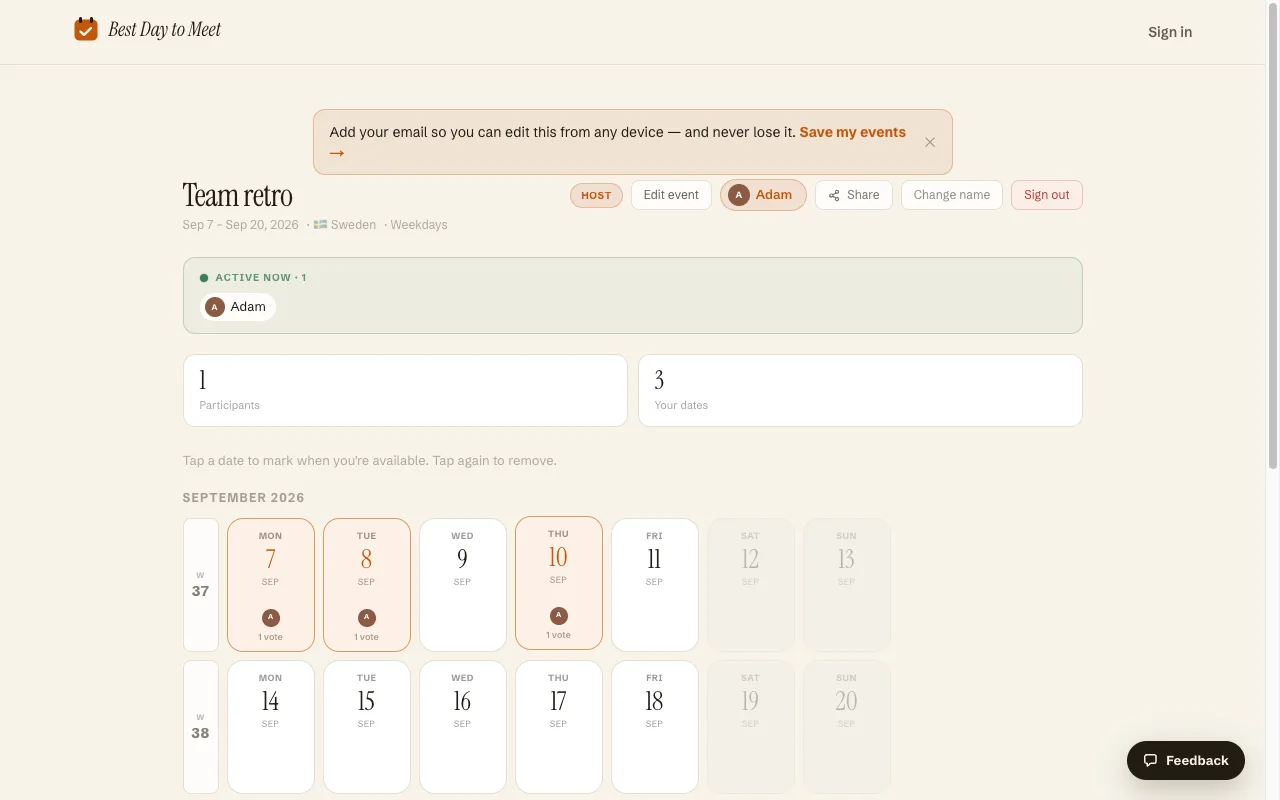
When the group settles, the Host locks the winning day and exports an .ics file. Voting on a calendar of days, sharing, holidays, voting deadlines, .ics export, and accounts are all free. The optional Pro tier, as a subscription or a one-time unlock for a single Event, adds Date Options mode, multi-day Events, the comment feed, and branding removal.
When Calendly is the better choice
- You are the one being booked. Clients, candidates, students, or prospects picking a slot against your real availability is the exact job Calendly does, and no day poll replaces it.
- The meeting needs a specific start time and a duration. Calendly's poll proposes times of a set length and turns the winner into calendar invites automatically.
- Time zone math is the hard part. Calendly detects invitee time zones and converts, which matters far more at hour scale than at day scale.
- You want the surrounding workflow: reminders, reschedule links, payments through Stripe or PayPal, routing forms, or the AI notetaker. Those live on the paid tiers and have no counterpart here.
- One calendar connection and one event type are enough for you. That free plan is genuinely free and needs nothing from us.
Running a day poll instead
- On the homepage, name the Event and choose how people pick: Calendar, where Participants mark every day that works across a range, or Date options, where you propose specific dates or blocks.
- Set the date range and the optional extras: weekday filters, public holidays for your country, a voting deadline.
- Share the link or the join code. Participants vote with a name from any device, no signup and no calendar connection, and see the running totals as they go.
- Lock the winning day and export the .ics. If the group then needs an exact hour with someone specific, that is the point to hand out a Calendly link.
Frequently asked questions
Does Calendly have a group poll feature?
Yes. Meeting Polls let you propose several meeting times and have invitees vote on them. Calendly's pricing table marks the feature as included on Free, Standard, Teams, and Enterprise, and its FAQ confirms every plan has it.
Is Calendly free?
The Free plan is free with no credit card and covers one event type, one calendar connection, one-on-one scheduling, a customizable booking page, and the browser extension. Standard is $12 per seat per month, or $10 billed yearly; Teams is $20 per seat per month, or $16 billed yearly; Enterprise starts at $15,000 a year.
Do I need a Calendly account to answer a poll?
No. The pricing page tooltip says invitees need neither a seat nor an account. The host is the one who signs up and connects a calendar before any poll or booking link exists.
Why use something else if Calendly's polls are free?
Because Calendly polls ask which start time works, and some groups first need to answer which day. A Best Day To Meet Event has Participants mark whole days across a range, with no host calendar to connect and no signup for anyone.
Is Best Day To Meet free, or is there a catch?
The core is free with no account, no card, and no ads: unlimited Events, day voting, sharing, public holidays, deadlines with a manual lock, and .ics export. An optional Pro tier, billed as a subscription or a one-time unlock for one Event, adds Date Options mode, multi-day Events, the comment feed, and branding removal.
Can I use both?
That is the common setup. Pick the day with a link everyone can vote on, then use a Calendly link for the one-on-one bookings that hang off it, such as the interviews inside a hiring day or the slots inside an open office afternoon.
Comparing more options? See Best when2meet alternatives.