How to find a date that works for everyone
You are trying to get a group of people to agree on a day. A dinner with friends, a long weekend away, the next book club, a family reunion, a team offsite. You asked the group chat "when works for you?" and got four maybes, one firm no for a date nobody had proposed, and silence from the two people whose answer matters most. Three days later the thread has moved on to something else and the plan has no date.
This guide is the whole method for fixing that. It covers why day-level decisions are a different problem from time-of-day decisions, compares the three ways groups actually coordinate (the chat thread, shared calendars and spreadsheets, and availability polls), walks through running a date poll step by step, and then handles the failure modes: people who never answer, deadlines, and groups spread across time zones. At the end there are sections for the four occasions this question usually comes attached to: a group trip, a book club, a family reunion, and a team offsite.
The short version, if you only read one paragraph: propose concrete options instead of asking an open question, collect availability in one place instead of scattered messages, set a deadline, and decide on the best-attended date rather than waiting for a perfect one. A perfect date usually does not exist for groups of five or more, and treating that as a normal outcome rather than a failure is what lets plans actually happen.
Why picking a date is harder than it looks
An open question like "when is everyone free?" hands each person an unbounded task. To answer honestly, they have to scan weeks of their own calendar, guess which weeks you meant, and commit in public before knowing what anyone else said. Most people respond to that task by not doing it, or by replying with something safe and useless like "I'm pretty flexible."
Closed questions get answers. "Can you do March 7, 14, or 21?" takes thirty seconds to answer because the work of generating options has been done for the person. Every functioning method below is some version of turning the open question into a closed one.
The second problem is bookkeeping. In a chat thread, availability arrives as prose ("any weekend but the 14th, and Fridays are hard") spread across dozens of messages, and someone has to compile it by hand. The organizer becomes a human spreadsheet. When one person changes their answer, the compilation is stale and nobody knows. Groups do not fail to pick dates because their calendars never overlap; they fail because nobody can see the overlap.
Why hour-grid schedulers fail day-level decisions
Most scheduling poll tools were built for meetings, so they ask participants to paint their availability onto a grid of hours or 15-minute cells across a week. That design answers "what time on Tuesday?" well. It answers "which Saturday this spring?" badly, for three reasons.
First, scale. A meeting poll covers one week; a trip or reunion decision covers a season. Painting hour cells across twelve candidate weekends is dozens of drag operations per person, and on a phone the drag-to-select grid is genuinely hard to operate. The people most likely to give up are exactly the casual participants (a grandparent, the friend who never opens links) whose answers you need.
Second, false precision. Nobody knows their hour-by-hour availability three months out, but almost everyone knows day-level facts: which weekends they are away, when the school term ends, which week the on-call rotation lands on them. An hour grid forces people to invent precision they do not have, and invented answers produce a confident-looking heatmap built on guesses.
Third, the result is noise. An hour-level heatmap over many weeks shows partial overlaps everywhere and rarely produces the one thing you need, a clear "this day beats the others." For day-level decisions you want a calendar where each person marks whole days, and a count on each day. Which day has the most votes should be readable at a glance, without interpreting a gradient.
If your decision really is time-of-day (a 90-minute call this week), an hour grid is the right tool and we compare the main ones on our when2meet alternatives page. The rest of this guide assumes the harder, more common case: the group needs a day.
The three ways groups coordinate, compared
The group chat thread
Asking in the chat is the default because it costs nothing to start. For two or three people it often works: someone proposes a date, everyone reacts, done. The method breaks somewhere around four or five people, and it breaks in a predictable pattern. Early replies anchor on the first proposed date, later replies contradict them, nobody re-reads the whole thread before answering, and availability statements expire silently as people's plans change. The thread has no memory: three weeks of negotiation compresses into scrollback nobody will search.
The chat is good for one thing polls are bad at, which is discussion. "Should this be a weekend or a weekday evening?" is a conversation, and it belongs in the chat. Have that conversation first, then move the date question into a structure that can count.
Shared calendars and spreadsheets
The next escalation is shared visibility: a Google Calendar everyone can see, an Outlook scheduling view at work, or a spreadsheet with a row per person and a column per candidate date.
Inside one company this can work well, because everyone already keeps their work calendar accurate and lives in the same tool. Free/busy lookup answers "when are all six of us in the office?" instantly. The approach collapses for mixed groups, which is what friends, families, clubs, and trips always are. Someone is on Google, someone on Outlook, several people keep no digital calendar at all, and personal calendars say busy without saying what kind of busy. A calendar that says free also does not mean willing: free on the 14th does not mean wanting to spend the 14th at your event. Availability for social plans is an opt-in statement, and only the person can make it.
Spreadsheets fix the platform problem (everyone can edit a sheet) at the cost of structure. Nothing stops overwrites, nothing counts votes, columns multiply, and on a phone a shared sheet is barely usable. A spreadsheet is a date poll built by hand; the tool below is the same idea with the counting done for you.
An availability poll
A date poll inverts the chat thread. The organizer proposes the candidate days once, each person marks the days they can make against a calendar, and the tally per day is visible to everyone the whole time. Answering takes under a minute, arriving late does not matter because the poll holds the state, and changing your answer updates the count instead of adding a contradictory message to a thread.
The mechanism does the two things the other methods cannot. It closes the question, because people react to specific days instead of generating options. And it keeps the bookkeeping, because the overlap is computed continuously instead of compiled by a tired organizer at 11pm.
Any date poll tool gives you most of this. The differences that matter in practice are whether participants need an account (every login step loses people), whether it works one-handed on a phone (where most votes are cast), and whether it shows day-level context like public holidays. The walkthrough below uses Best Day To Meet, which is built specifically for the whole-day case; the core (calendar voting, sharing, deadlines, holidays, calendar export) is free without an account, and a paid Pro tier adds power features noted where relevant.
Step-by-step: run a date poll
The whole loop is: create an Event, share one link, Participants vote, decide. Allow ten minutes of your own time end to end, most of it optional.
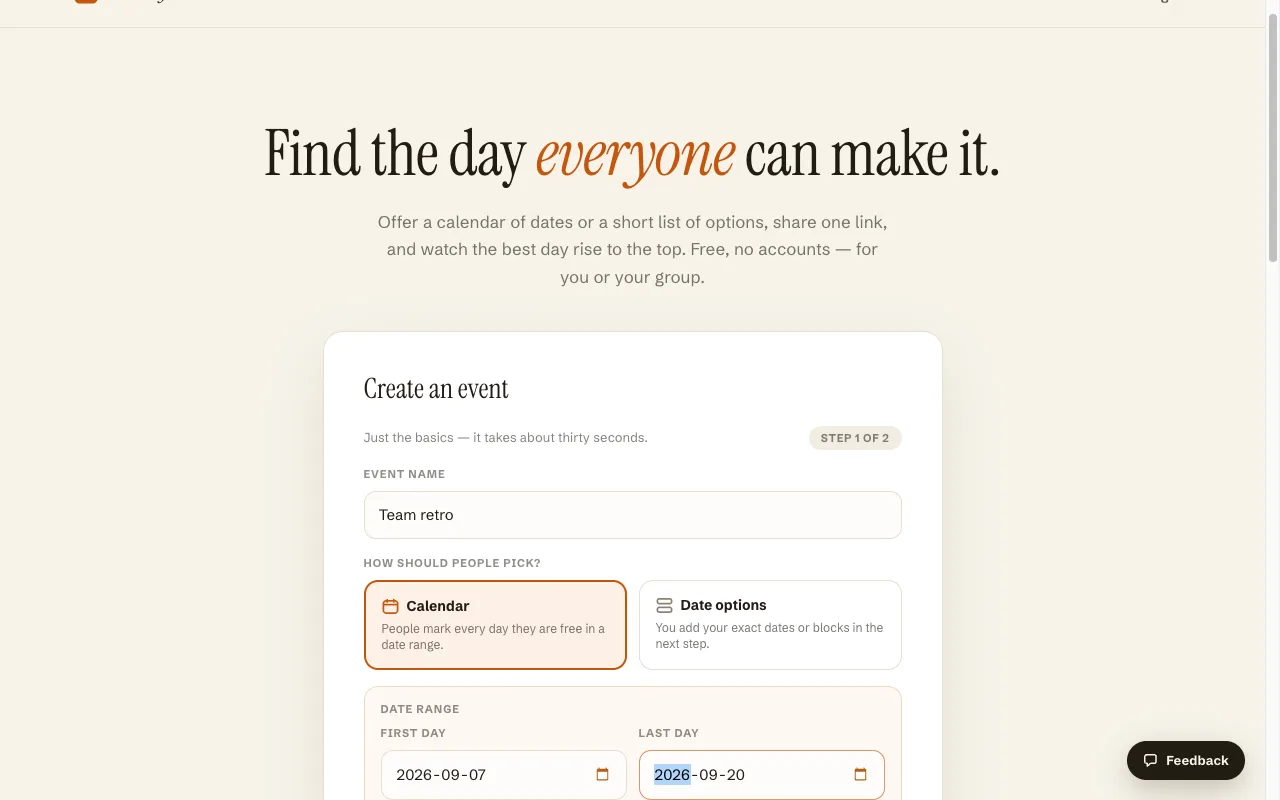
1. Create the Event
From the homepage, name the Event ("Sarah's 40th", "Q4 offsite") and choose the date range Participants will vote inside. Keep the range honest: if the trip has to happen before school starts, end the range there. A wide range feels generous but dilutes votes across too many days; two to six candidate weeks is the practical sweet spot. There is no sign-up step, and an optional account exists if you want your Events to follow you across devices.
2. Choose the mode
Best Day To Meet has two modes, and the choice is really a question about who should do the narrowing.
Calendar mode (free) presents the range as a calendar and every Participant marks each individual day they are free. Use it when the event is a single day (party, dinner, club meeting, one-day offsite) or when you genuinely do not know which part of the range will work and want the group's raw availability to tell you.
Date Options mode (part of the Pro tier, as a subscription or a one-time unlock for a single Event) flips the narrowing to the Host: you curate a handful of specific options, such as three particular long weekends, and Participants accept or decline each option as a whole block. Use it for multi-day plans where partial availability is worthless. For a Friday-to-Sunday cabin trip, knowing that someone can make the Saturday of option two is no use; you need "I can do that whole weekend, yes or no." Multi-day Events are likewise a Pro feature.
A useful default: single day, Calendar mode; multi-day blocks, Date Options mode.
3. Optional settings that earn their keep
A deadline closes voting at a date you pick, which converts "I'll get to it" into "before Thursday" (more on this below). An Event description carries the context people otherwise ask in the chat: what the plan is, roughly what it will cost, who is invited. Public holidays for your country render directly in the voting calendar, which quietly prevents the classic mistake of scheduling the reunion on a holiday weekend nobody checked.
4. Share the link
Creating the Event gives you a link, and the link is the entire distribution model. Post it in the group chat, the family WhatsApp, the club email. Nobody needs an app or an account to vote; anyone with the link can open it and mark days. When you post it, say the deadline in the same message and name what happens next: "vote by Sunday, I'll confirm the date Monday."
5. Participants vote
Each Participant opens the link, enters a name, and taps the days they can make. The calendar shows a running count on each day and a list of who has answered, so the state of the decision is public the whole time. That visibility does real work: people can see whose answer is still missing without the organizer chasing anyone in public, and a Participant whose plans change can come back to the same link and update their days instead of announcing a correction to the thread.
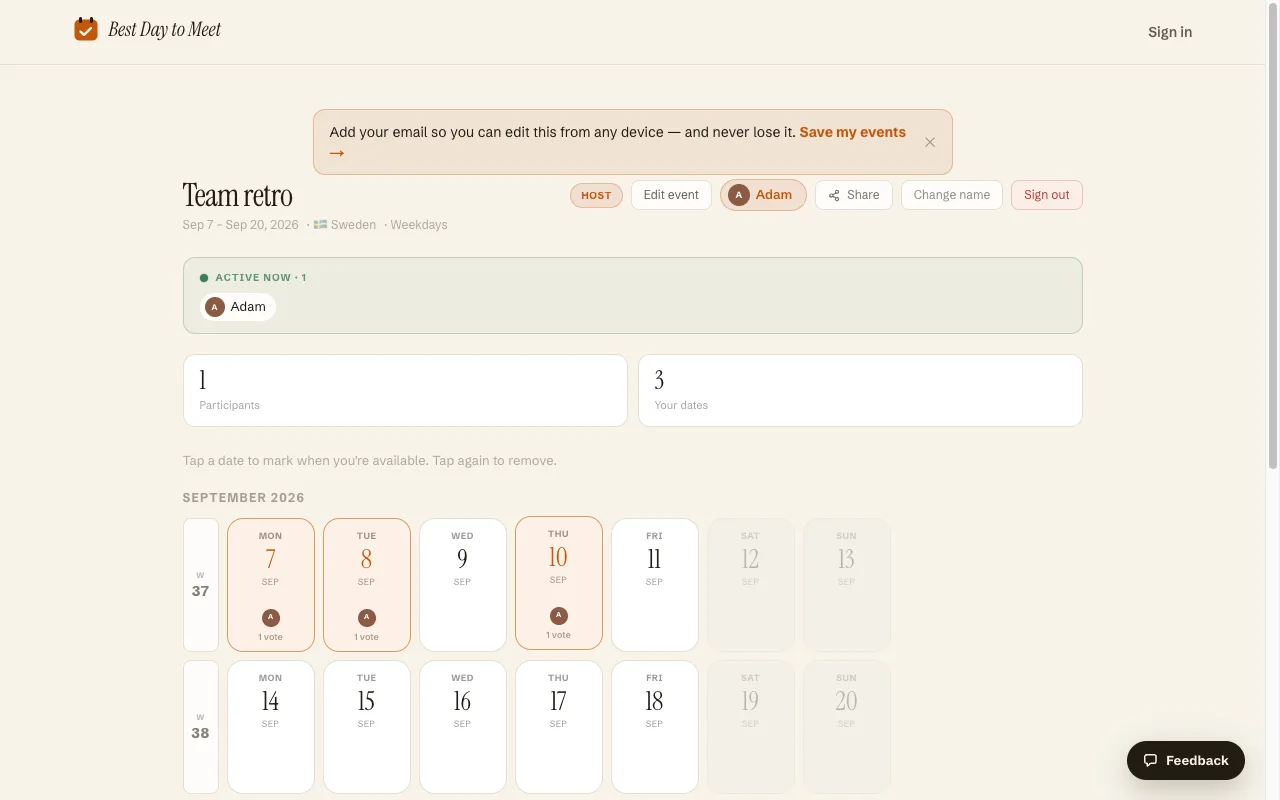
6. Decide, announce, and put it in calendars
When the deadline passes (or the votes flatten out), the best-attended days are visible on the calendar. Pick one, announce it back in the chat where the conversation lives, and export the decision as an .ics file so the date lands in people's actual calendars, Google, Apple, or Outlook alike. A date that made it into calendars is a plan; a date that lives only in a chat message will be double-booked within a week.
One honest note on "works for everyone": with eight or more people the most common good outcome is a date that works for almost everyone. The poll's job is to make that trade-off visible, so you can choose "the 21st, which seven of nine can make" deliberately instead of stalling in search of a unanimous day that is not coming.
Stragglers and deadlines
Every group poll has stragglers, and most failed polls die of them: the organizer will not decide while three people are missing, and after two weeks the plan has quietly expired. Three habits fix nearly all of it.
Set the deadline at creation, not after the stalling starts. A deadline announced up front is logistics; the same deadline imposed after ten days reads as a rebuke. Three to five days is right for most social plans. Longer deadlines do not produce more answers, only later ones, because people answer adjacent to the deadline whenever they answer at all.
Chase privately, once. The vote list shows exactly who is missing. A direct message ("need your days for the trip poll by Friday, 20 seconds") outperforms another group-wide nudge, which the missing people have already proven they ignore.
Decide on time, without the stragglers if needed. Deciding with seven of nine answers is the deadline meaning what it said. Groups learn quickly, and the second poll you run will get faster answers because the first one demonstrated that voting is how the date gets chosen. The alternative lesson, that polls drift until someone forces the issue in the chat anyway, also gets learned quickly, and then no one answers your polls at all.
Timing the send helps too. A poll posted Sunday evening or Monday morning catches people while they are looking at the week ahead; one posted Friday at 6pm is buried under the weekend.
Time zones vs. whole days
Hour-level scheduling across time zones is a hard problem: 5pm in Stockholm is 8am in San Francisco, and every meeting-poll tool has to translate each slot per viewer.
Day-level scheduling mostly dissolves the problem, which is an underrated reason to decide dates and times separately. "Saturday March 14" is Saturday March 14 in Lisbon and in Singapore; a whole-day vote needs no conversion, so a scattered friend group or a remote team can pick the day with a simple calendar poll and no time-zone arithmetic at all. Two edge cases deserve care. For extreme spreads (Australia with the US west coast), a late-evening slot can land on the next calendar day for part of the group, so name the time zone when you later set the hour. And travel days are not availability: someone flying in on the Friday should not mark Friday as free just because the plane lands that evening. Put "mark travel days as unavailable" in the Event description and the votes will mean the same thing for everyone.
Decide the day first with the whole-day poll. Then, if the event needs a start time, settle it in one round with a much smaller question ("6pm or 7pm?") once the day is fixed.
Picking a date for specific occasions
The mechanics above are the same for every occasion; what changes is the range you offer, the mode you pick, and the deadline you can get away with.
A group trip
Trips are multi-day blocks, so this is the clearest Date Options mode case: offer three or four specific windows ("June 12–15", "June 26–29", "July 10–13") and have each person accept or decline whole windows. Run the poll three to six months out so people can still block the time at work and fares have not peaked, and state the rough budget in the description, because cost silently drives availability answers more than calendars do. Expect to lose someone: above about six travelers, a window that suits everyone is rare, and the poll's job is to show which window loses the fewest. If your group would rather see raw day-level availability first and shape windows from it, Calendar mode over a whole month works as a first pass, with a second, short Date Options poll to confirm the block.
A book club
A book club needs a repeating answer more than a clever one. Run one Calendar mode poll across three or four candidate weeks once, pick the winning weekday, and then declare a cadence: first Thursday of the month, say. A predictable slot beats a monthly renegotiation, because members plan around a rhythm but ignore a recurring poll. Re-poll only when the cadence breaks (December, summer holidays) or when attendance sags enough to suggest the slot has stopped fitting people's lives. Deadlines can be short here; club members are a warm audience, and two or three days is plenty.
A family reunion
Reunions have the widest range of participant tech comfort, which is why the no-login link matters most here: a poll that requires an app store visit or an account will not get answers from every generation, and a reunion date chosen without the grandparents' votes is a scheduling failure regardless of the tally. Post one link in the family channels and let everyone tap days. Range-wise, most families land in June to September for school holidays and easier travel, but shoulder-season dates (late September, October) cut travel costs for the relatives flying in, so offer both if cost matters to your family. Watch the holiday markers in the calendar: a long weekend reads as convenient but carries peak fares and competing invitations. Reunions also reward long runways, so open the poll six months to a year out and set a generous but firm deadline, such as three weeks.
A team offsite
Offsites fail on collisions more than on preferences, so before offering any dates, remove the ones that cannot work: quarter-end, the industry conference half the team attends, school holidays for parents on the team, on-call weeks. Poll the survivors in Calendar mode for a one-day offsite, or as two or three curated windows in Date Options mode for an overnight trip. Deadlines are easy to enforce at work; two or three days is standard. Decide the date before booking anything, since a venue deposit placed on a guessed date is how offsites end up half-attended. The comment feed on an Event (a Pro feature) gives the date discussion a home next to the votes, which spares your team channel the reply-all thread about whose week is impossible.
Frequently asked questions
What is the easiest way to find a date that works for everyone?
Propose specific candidate days instead of asking "when are you free?", collect answers in one place, and set a deadline. In practice that means a whole-day availability poll: create an Event with your date range, share the link, and Participants tap the days they can make. The best-attended day is visible on the calendar without anyone compiling replies.
How do I find a date without making everyone sign up for something?
Use a poll that works from a bare link. On Best Day To Meet, Participants open the shared link, enter a name, and mark days; there is no account, app, or email verification step. This matters most for mixed groups (families, friend groups) where a single sign-up wall reliably costs you several answers.
Is Best Day To Meet free?
The core is free: unlimited Events, calendar voting, sharing, deadlines, holiday display, and .ics export, with no account required. A paid Pro tier (subscription, or a one-time unlock for a single Event) adds Date Options mode, multi-day Events, the comment feed, and branding removal.
How many date options should I offer a group?
Enough to give real choice, few enough that votes concentrate: three to six candidate days for a single-day event, or three or four windows for a trip. Offering an entire quarter spreads votes so thin that no day wins clearly, and it makes each person's voting task feel heavy, which costs you answers.
What if no date works for everyone?
Above five or so people, expect this. Decide on the best-attended date, tell the people who miss out early, and if the miss hurts (a core person, a guest of honor), run one short follow-up poll around their availability rather than reopening the whole question. A visible tally makes this trade-off explicit instead of leaving the organizer to guess who they are disappointing.
Should I use a poll or just check everyone's shared calendar?
Shared calendars work inside one company on one platform. For mixed groups they fail on both platform coverage (not everyone keeps a synced calendar) and meaning (a free evening is not an offer to attend). A poll collects the thing you actually need, which is each person's explicit yes for specific days.
How far in advance should a group pick a date?
Match the runway to the commitment. Dinners and club meetings: one to three weeks. A one-day offsite: one to two months. A group trip: three to six months, so people can arrange leave before fares climb. A large family reunion: six months to a year. In every case, pick the date at the start of that runway; venues, tickets, and travel all get easier once the day is fixed.