Sports team scheduling: find dates the whole squad can make
You have eighteen names on a roster and a training slot to fill. Four of them work shifts, two are students heading into exam weeks, one turns out for a second club on Sundays, and the group chat answers "when can everyone train?" with three thumbs-up and a long message about last week's referee. Someone ends up carrying the squad's availability around in their head, and that someone is you.
This page is about the version of the problem a club secretary, captain or coach actually has. The names are the same every month, the week has a shape already (Tuesday and Thursday sessions, Sunday fixtures), and whatever you decide now you will have to decide again in four weeks. The walkthrough uses Best Day To Meet, and everything described here was checked against the live site in September 2026. The screenshots come from a squad Event created while writing this page.
What makes a squad its own scheduling problem
Four things separate a squad from a group of friends picking a dinner date, and each one changes what a good poll looks like.
The roster is fixed and you know it. With friends, "who is even coming?" is half the question. With a squad you have a list, so the useful output is not just which date wins but which four people have not answered yet, by name.
You need a number, not everyone. Eleven-a-side needs eleven plus substitutes; a five-a-side session needs eight to be worth booking the pitch. Waiting for unanimity from an eighteen-person roster means waiting forever. The decision you are making is "does this date clear the bar", and the bar is a number you should say out loud before you open the poll.
It repeats. A dinner poll runs once. A squad poll runs every month for the length of a season, which means the cost of a fiddly setup gets paid nine times, and so does the cost of nagging.
The candidate dates are not arbitrary. Nobody is asking the squad to consider a random Wednesday in October. Training is Tuesday and Thursday, matches are Sunday. A poll that offers the whole calendar is asking players to answer a much bigger question than the one you have.
That last point is where most general-purpose scheduling tools make squad organisers do extra work, and it is the one worth fixing first.
Build the poll in the shape of your week
When you create an Event you set a date range, then narrow what inside that range counts. Two controls do the narrowing.
"Which days count" toggles weekdays, weekends and public holidays on or off, with a country selector driving the holiday list. "Repeat pattern" then takes an interval in weeks and, optionally, a set of weekdays: pick Tuesday, Thursday and Sunday and every other day in the range drops out of the vote.
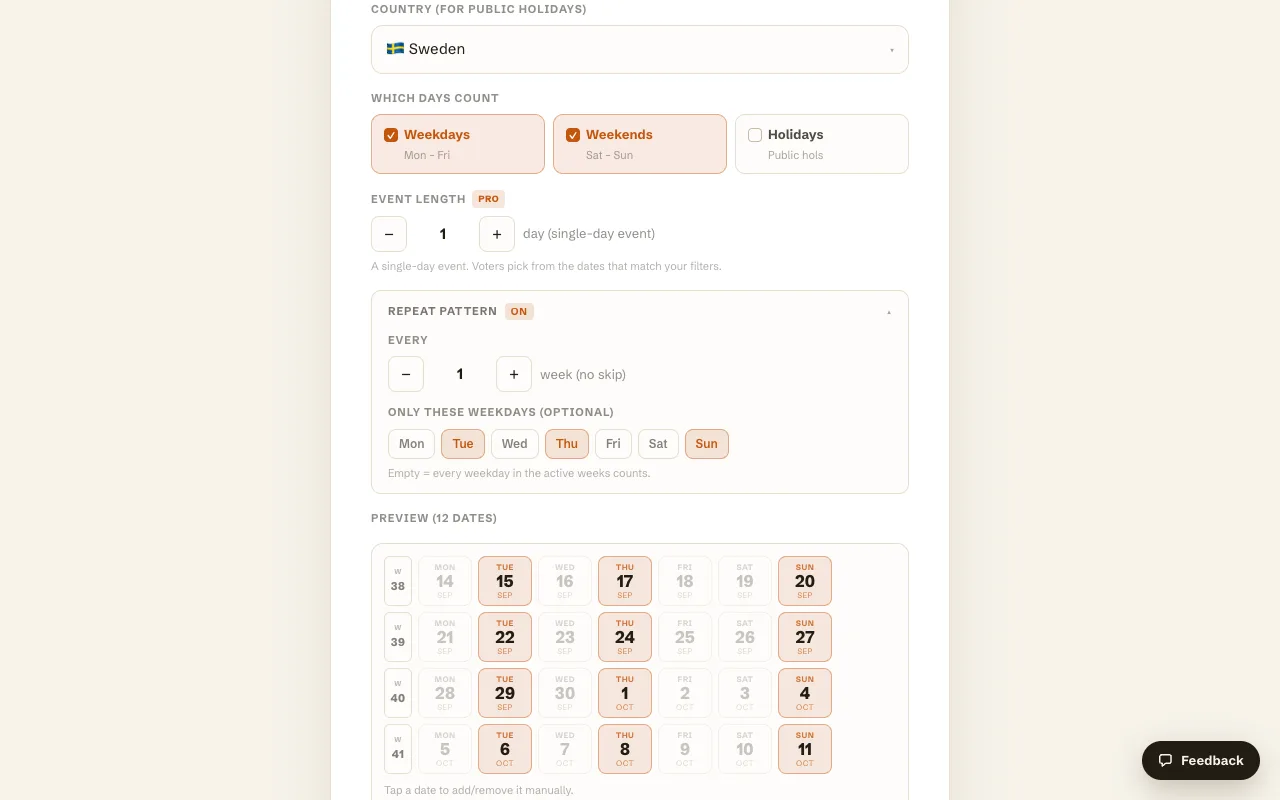
The effect is easy to measure. A four-week range with weekdays and weekends enabled offered 20 candidate dates. Selecting Tue, Thu and Sun in the repeat pattern cut the preview to 12: the three sessions a week the squad actually plays. Setting the interval to every 2 weeks instead of every 1 would halve it again, which is the right setting for a team that trains fortnightly. The preview is editable date by date, so you can tap the Thursday of half-term out of the poll before anyone sees it.
Twelve dates is a poll a busy player finishes on a phone in under a minute. Thirty-one is a poll they open, scroll, and come back to later, which is the same thing as never.
Holidays are worth a moment of thought here. Turning the Holidays toggle off removes public holidays for your country from the vote, which suits a team whose players travel to family on those weekends. Leaving it on suits a club that plays holiday fixtures. Either way the choice is made once, at setup, rather than discovered when four people say they are away.
What a player has to do
The Event gives you one link and a short code. The share screen carries a QR code, an editable invite message, and buttons for WhatsApp, email, SMS and copy, which covers how squads actually communicate.
A player opens the link, types a name, and taps the dates they can make. No account, no app, no email verification. The gate before the calendar lists who has already voted, so a player arriving late can see the poll is real and moving. Anyone who wants to look without committing can browse without voting.
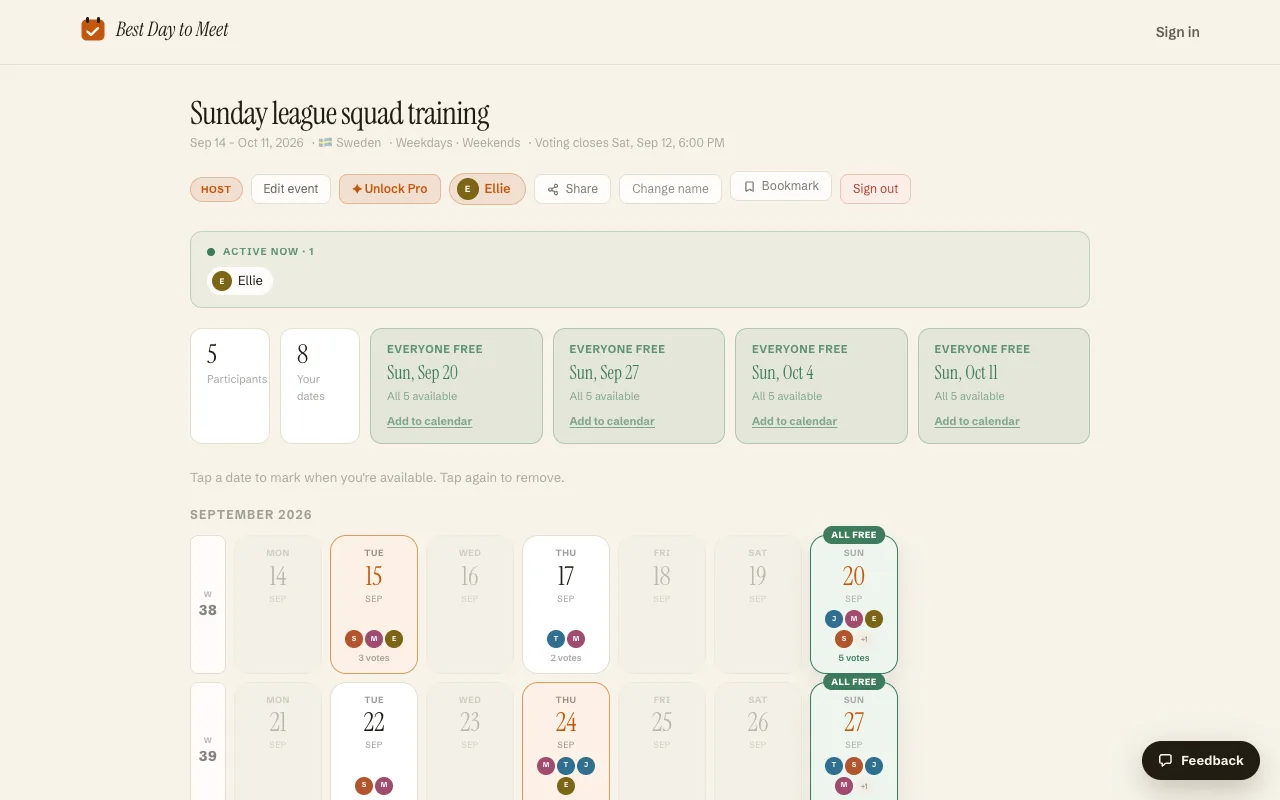
Two counters sit above the calendar: Participants, and how many dates you personally marked. Above those, any date the whole squad can make gets its own card with an "Add to calendar" link. In the Event above, all five Participants marked every Sunday in the range, so four Sundays came back as clear.
Reading the board
Each date carries the initials of the people who marked it and a vote count, and the dates outside your repeat pattern stay greyed out and untappable.
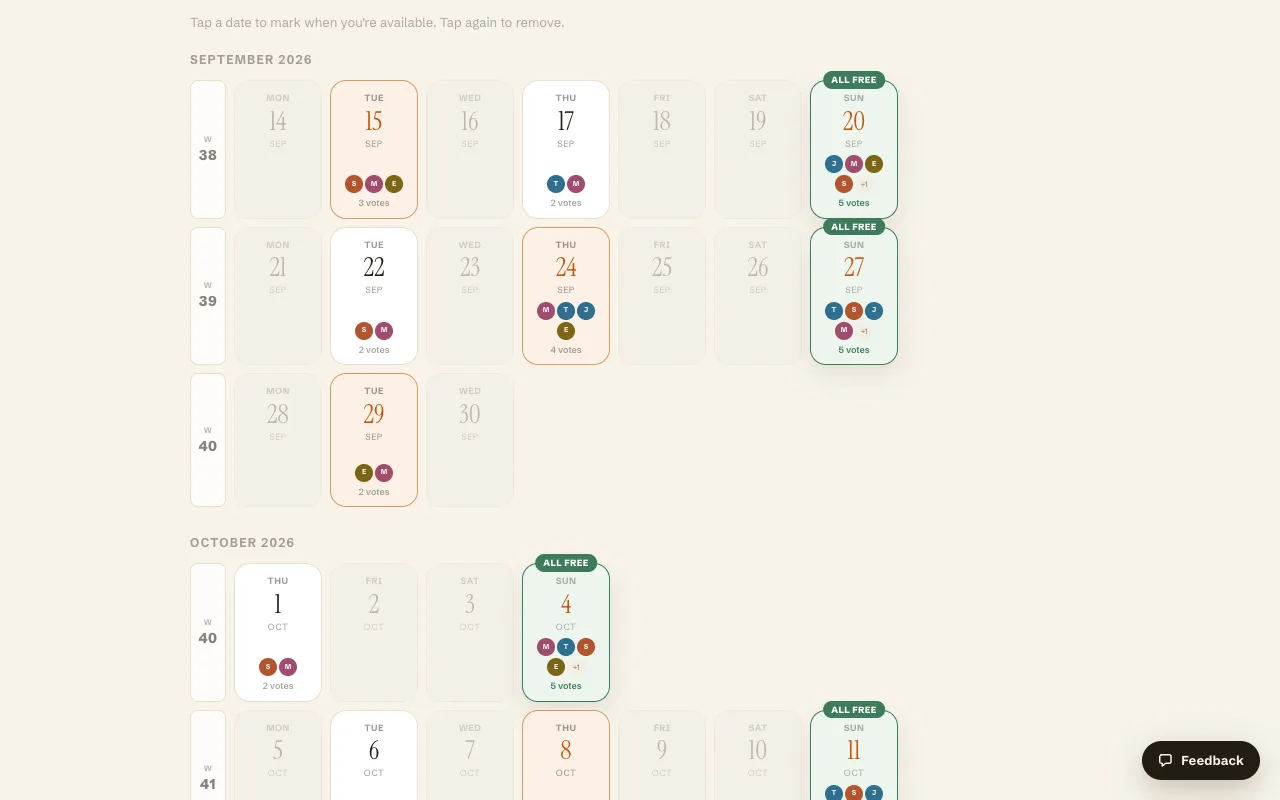
Sunday 20 September and Sunday 27 September both show five of five. Thursday 24 September shows four, Tuesday 22 shows two. That spread is the useful part. A squad rarely gets a clean sweep on a training night, and the initials tell you who the two are, so you can ask them directly instead of asking the whole chat again.
This is where the quorum number earns its keep. If eight is your minimum for a session, a date showing nine is a yes, and you can book the pitch without a further round of discussion. Voting stays on whole days rather than time slots, which suits a team whose training slot is already fixed at 7pm. The open question is which Thursday.
Deadlines beat nagging
Set the voting deadline while you create the Event. It appears in the Event header as a plain line of text ("Voting closes Sat, Sep 12, 6:00 PM") and closes voting automatically at that moment, in your time zone. Deadlines are part of the free core.
Three or four days is enough for a squad. Players answer near a deadline whenever they answer at all, so a longer window produces later replies rather than more of them. Announce the deadline in the same message as the link, and say what happens after it: "vote by Thursday, I'll confirm the pitch Friday."
Then decide on time with whoever answered. The first month a captain does this, two people miss out and complain in the chat. The second month, those two vote on the day the link goes out. Let one deadline slip and the squad learns that the real decision happens later, somewhere else, and after that nobody bothers with the poll.
The Host also gets a "Close voting now" button, which is the version of the same idea for a squad that has clearly finished answering.
Tournaments, away weekends and cup runs
Some team decisions are not single days. A tournament is a Saturday and a Sunday; an away trip is Friday night to Sunday. Knowing that a player can make the Saturday of a three-day block is no use to you, because a squad member who arrives halfway through a tournament is a spectator.
Two paid features cover that case. Event length turns a calendar Event into multi-day windows, so Participants accept or decline a whole block. Date Options mode hands the narrowing to you: list the two or three specific weekends the club is considering, and the squad votes on them as units. Both sit in the Pro tier, which is sold as a subscription or as a one-time unlock for a single Event, so a club that runs one tournament a year can pay for that one Event and keep using the free core for weekly training.
The comment feed, also part of Pro, puts the discussion about transport and costs next to the votes instead of in the chat where it buries the link.
When a poll is not what your team needs
A few teams should not bother with any of this.
If your league fixes the fixtures, there is nothing to vote on. Print the list and move on; the only open question is availability per fixture, which is a different tool's job.
If your club already runs on a team-management app with a roster, subs collection and a per-match availability toggle, adding a separate date poll splits the source of truth. Use what the club pays for.
And if the squad has already agreed the day and is arguing about the time, a whole-day poll answers the wrong question. Best Day To Meet does not do hour-by-hour voting at all, by design. Settle a start time in the chat, or use an hour-grid tool for that one decision.
What is left is the common case. A fixed roster, a repeating rhythm, and no one system the whole roster already opens.
Running a squad poll, step by step
- Decide your quorum before you open anything. Write down the number of players that makes the session worth holding.
- From the homepage, name the Event ("Sunday league squad training", "U14s September sessions") and set a range that covers the next block of weeks.
- Open Repeat pattern and select only the weekdays you play. Check the preview count. If it is above about fifteen dates, tighten the range or the interval.
- Set a voting deadline three or four days out.
- Share the link in the squad chat with the deadline and the quorum in the same message.
- Watch the Participants counter rather than the chat. Message the missing players directly, once.
- When the deadline passes, pick the best-attended date that clears your quorum, use Add to calendar to send the .ics into everyone's calendar, and post the result back in the chat.
Frequently asked questions
What is the best way to schedule a sports team?
Poll only the dates you actually play on, set a deadline, and decide on a quorum rather than on unanimity. In practice: create an Event with your date range, restrict it to your training and match weekdays with a repeat pattern, share one link, and pick the best-attended date that clears the number of players you need.
Do my players need an account to vote?
No. A player opens the link, types a name, and taps the dates they can make. There is no sign-up, no app and no email step, for them or for you. An optional account exists if you want your Events to follow you between your phone and a laptop.
Is Best Day To Meet free for a club?
The core is free: unlimited Events, calendar voting, the repeat pattern, holiday display, voting deadlines, sharing and .ics export. Pro adds Date Options mode, multi-day Events, the comment feed and branding removal, sold as a subscription or as a one-time unlock for a single Event.
How do I handle players who never respond?
The Participants list shows exactly who has voted, so chase privately and once. Beyond that, decide on time without them. A deadline you enforce in month one is why month two gets fast answers.
Can I run the same poll every month for the same squad?
Yes, and a fresh Event per block is usually better than one long-running poll, because availability three months out is a guess. Set the repeat pattern once, then create a new Event with the same settings for each block of weeks and reuse the same invite message.
Can the squad vote on time slots as well as dates?
No. Voting is on whole days, and on multi-day windows if you set an event length. For a team whose training slot is already fixed, that is the whole question anyway: which Tuesday, not which hour.
Comparing more options? See Find a date that works for everyone.