A LettuceMeet alternative for picking dates, not 30-minute slots
LettuceMeet is one of the few group schedulers that puts the create form on the homepage. You land on lettucemeet.com, tap the days you care about, press "Let's meet", and you have a working link before anyone asks you to sign up. We created a meeting, filled in availability as a guest, and scheduled the winning slot on the live product on 2 September 2026, without an account at any point.
If you searched for an alternative, the reason is usually shape rather than price. LettuceMeet asks two questions in a fixed order: which days, then which hours. Every meeting it makes is a grid of 30-minute cells inside a time window. That is exactly right when you are booking an hour with five colleagues, and awkward when the answer you need is "the 15th" and the start time will sort itself out later. Best Day To Meet is built for the second question.
What LettuceMeet gets right
Everything below came from the live site on 2 September 2026.
- No account to create a meeting. We went from the homepage calendar to a shareable link at lettucemeet.com/l/ with no email field in between.
- No account to respond either. After painting availability, the dialog is headed "Continue as Guest" and asks for a name, with "Email address (optional)" underneath and a separate link for people who do have an account.
- A single-screen result. Everyone's availability overlays on one grid, and the responder list counts heads as "Responders (0/1)", so you can see at a glance who has not answered.
- A real finalize step. The "Schedule" button turns the grid into a picker; choosing a block and saving prints "Monday, September 07 from 11:00AM - 12:00PM" at the top of the page with an "Unschedule" button next to it.
- Calendar overlay for signed-in users. The How it works page tells you to "connect your Google Calendar to view your events underneath", and the sign-up page lists Google and Outlook calendar connection as the first of three reasons to make an account.
- No third-party ads on any page we opened.
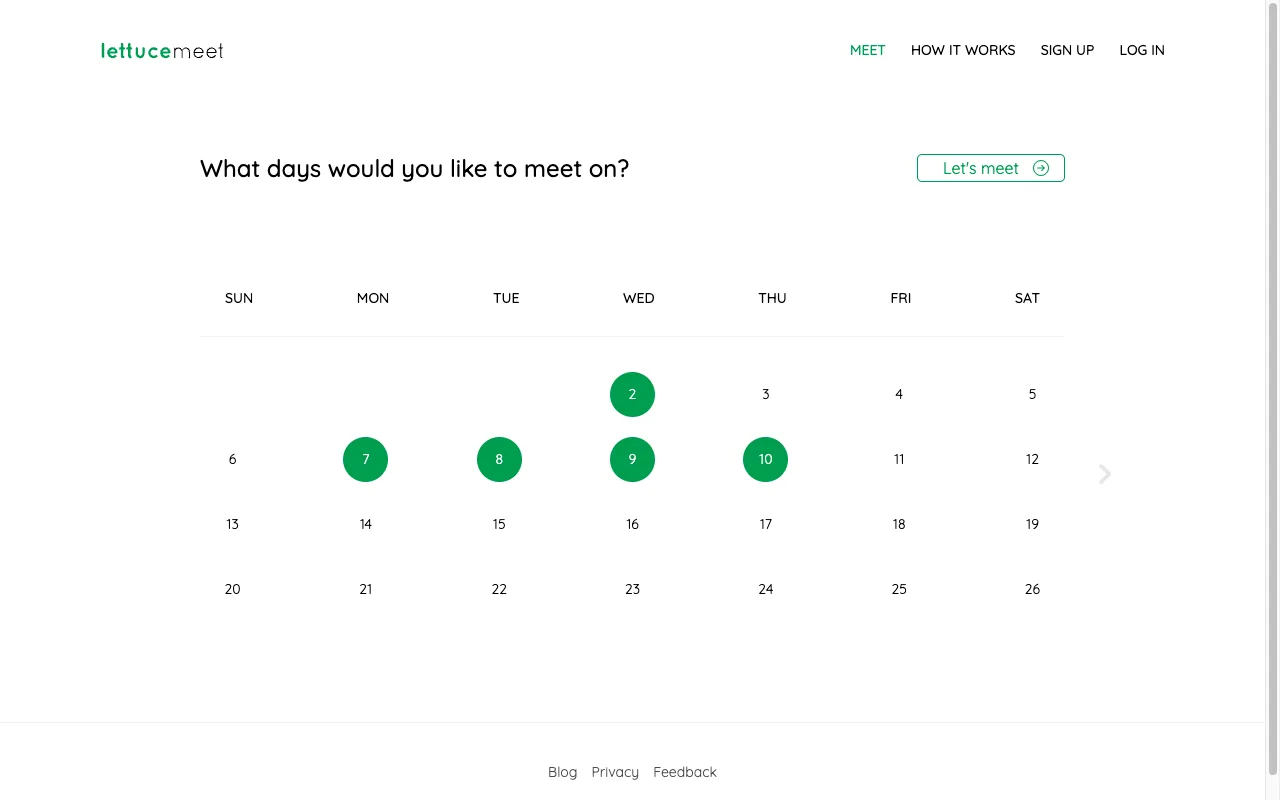
The day picker in that screenshot is also the clearest example of where the design leans. There is no month or year label above the grid, only weekday headings and numbers with an arrow to page forward. You find out which month you picked on the next screen, where the event grid is headed "Sep 2026".
Every meeting is a time grid
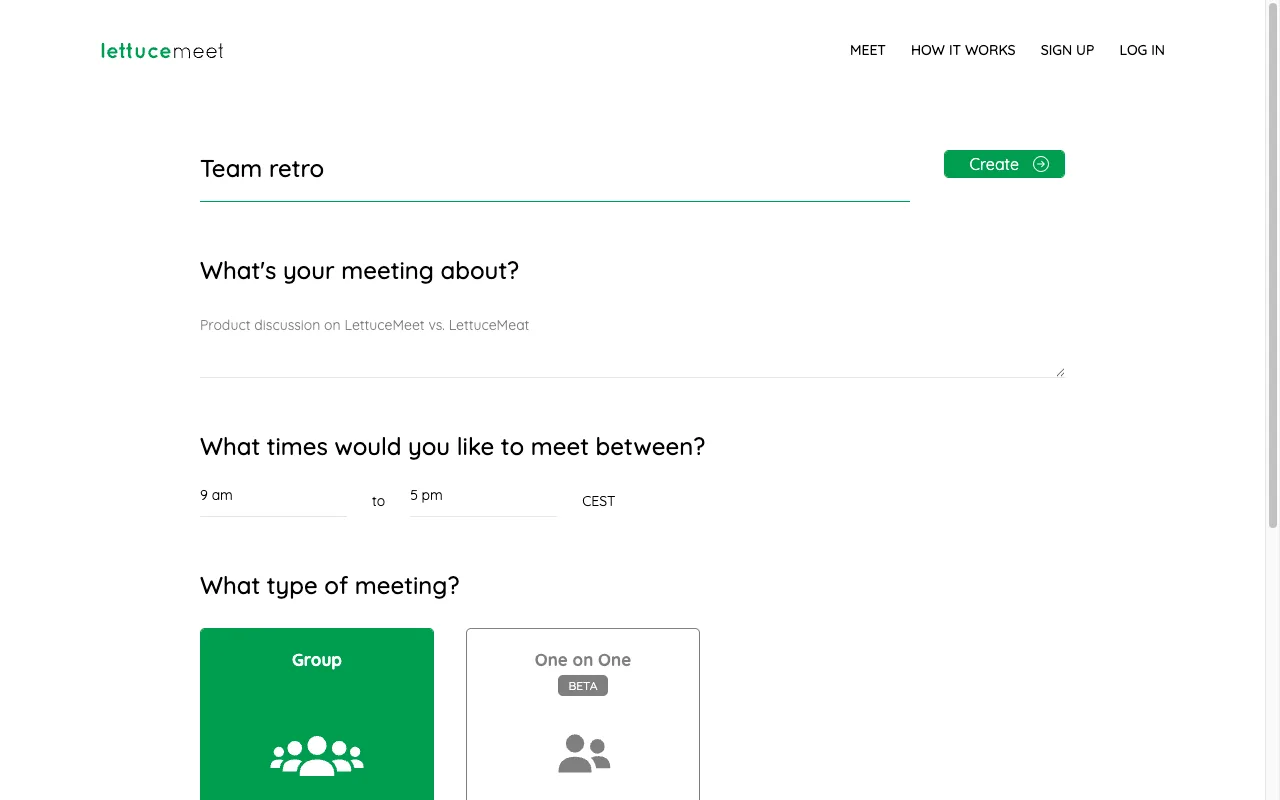
Press "Let's meet" and the second screen asks "What times would you like to meet between?" with 9 am and 5 pm already filled in and your time zone detected beside them. There is no whole-day option and no way to skip the question. Under Advanced Options, the only setting is "Limit scheduled meeting time to:", which offers None, 30 minutes, 1 hour, 1 hour 30 minutes, 2 hours, 2 hour 30 minutes, or 3 hours.
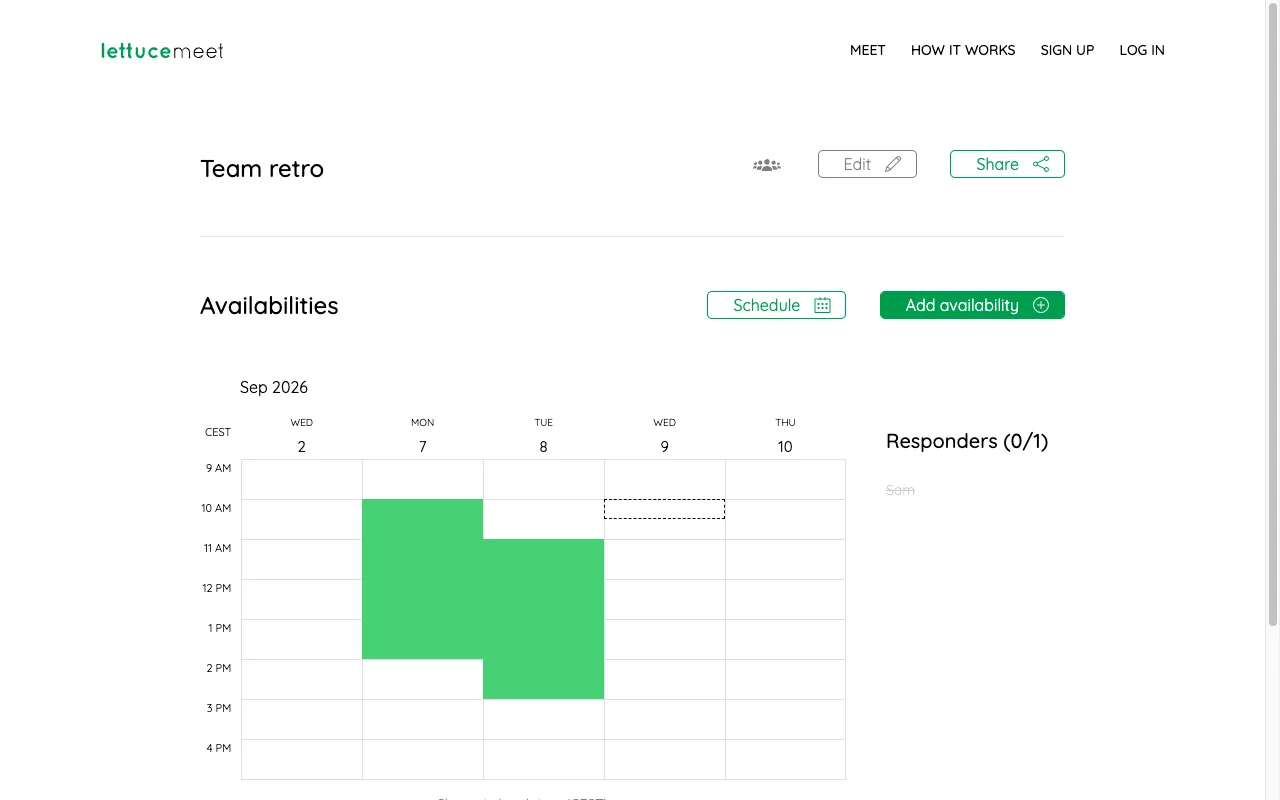
That choice propagates into the voting screen. Our five-day meeting rendered as 80 cells, eight hour rows by five day columns, split into 30-minute halves. Marking "I can do Tuesday" means dragging down sixteen cells, and a voter who does not care about the hour has to guess how much of the day to paint. If two people paint different halves of the same Tuesday, the overlay shows a thinner band rather than agreement on the date.
Two things we went looking for and did not find: a voting deadline, and public holidays. The create form has four sections and none of them mention either. The cookie banner is worth reading before you send the link around; it says "This website uses necessary and marketing cookies", and the Customize panel describes marketing cookies as "used to provide visitors with customized ads", switched on by default.
On price, LettuceMeet publishes nothing. Requesting lettucemeet.com/pricing returns the 404 page, and no upgrade prompt, counter, or locked control appeared anywhere in the flow we walked. The sign-up page sells an account on calendar integration, editing your meetings later, and notifications, not on a plan.
LettuceMeet vs Best Day To Meet
Every LettuceMeet fact in this table was observed on the live product on 2 September 2026.
| Feature | Best Day To Meet | LettuceMeet |
|---|---|---|
| Create without an account | Yes | Yes |
| Vote without an account | Yes, a name and nothing else | Yes, name required, email optional |
| What voters actually pick | Whole days across a date range | 30-minute cells inside a time window |
| Whole-day voting | The entire product | Not offered; every meeting has a start and end hour |
| Public holidays in the calendar | Shown for the Host's country | Not shown |
| Voting deadline | Free, or close voting by hand at any point | Not in the create form |
| Confirming the winner | Free: set the final date, everyone sees it | Free: 'Schedule' marks the winning block |
| Calendar file for the decision | .ics export, free | No download offered on the meeting page |
| Google or Outlook calendar overlay | No | Yes, for signed-in users |
| Ads | None on any plan | None seen; consent banner enables marketing cookies for customized ads by default |
| Paid tier | Optional Pro: $9/month, or $5 once for one Event | No pricing page; /pricing returns 404 |
Here is the same meeting on our side, with a two-week range instead of a time window:
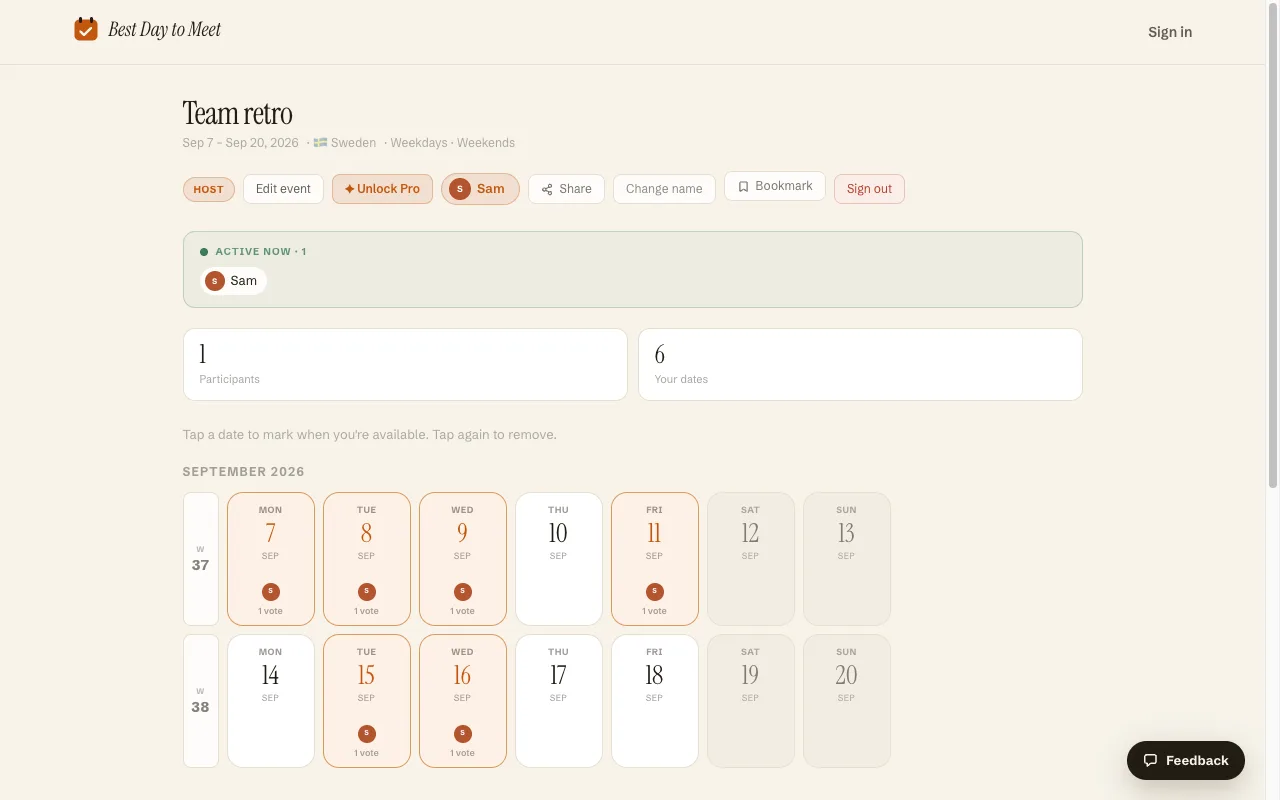
The unit is a day card, not a cell. Voters tap the days they can make and stop. The cards group by ISO week number, weekends are shaded so a Saturday proposal is visible for what it is, and public holidays for the Host's country are marked on the dates themselves, which stops somebody proposing the one Friday half the country has off. Setup asks which days count at all, so a work meeting can exclude weekends before anyone votes. When a day wins, the Host picks it as the final date, everyone who opens the link sees it, and the .ics export puts it in their calendar. Locking, deadlines, holidays and export are all free; Pro at $9 a month, or $5 once for a single Event, adds Date Options mode, multi-day Events, the comment feed and branding removal.
When LettuceMeet is the better choice
- You are choosing a start time, not a date. If the meeting is "an hour, some time next week", LettuceMeet's 30-minute grid answers that directly and we do not compete: Best Day To Meet votes on whole days.
- Your group is spread across time zones. LettuceMeet stamps the grid with each viewer's local zone and prints "Shown in local time" under it. Day voting has no clock to convert.
- People want their own calendar underneath the grid. Signing in connects Google or Outlook so you can see your existing events while filling in availability.
- You want the shortest possible path to a link. The create form is the homepage, and two clicks produce a shareable meeting.
Switching to Best Day To Meet
- On the homepage, name the Event and pick a date range. Calendar mode is the free default; Date Options, where you propose specific dates or multi-day blocks, is the Pro mode.
- Set the optional details: your country for public holidays, whether weekends and holidays count, and a voting deadline if you want voting to close on its own.
- Share the short link or read out the eight-character join code. Participants type a name and tap days. No account for them, none for you.
- When a date wins, choose it as the final date or close voting, then export the .ics so the decision lands in everyone's calendar.
Frequently asked questions
Is LettuceMeet free?
It behaves as a free product. Creating a meeting, responding to one and scheduling the winning slot all worked with no account and no payment prompt on 2 September 2026, and lettucemeet.com/pricing returns a 404 page rather than a plan comparison.
Do you need an account for LettuceMeet?
No, for either side. Creating a meeting asks for nothing, and responding shows a "Continue as Guest" dialog that requires only a name, with the email field marked optional.
Can LettuceMeet poll whole days instead of times?
Not as such. Every meeting carries a start and end hour, defaulting to 9 am and 5 pm, and the response grid is built from 30-minute cells. The closest you get to a day poll is painting the whole column for each day you can make.
What is the difference between LettuceMeet and Best Day To Meet?
The question each one asks. LettuceMeet asks which half-hours you are free inside a window, so it is strongest for booking a time. Best Day To Meet asks which days you can make across a range, adds public holidays and weekday filters to that calendar, and finishes with a final date and an .ics file.
Is Best Day To Meet free, or is there a catch?
The core is free with no account and no card: creating Events, sharing the link, day voting, public holidays, voting deadlines and .ics export. An optional Pro tier, $9 a month or a $5 one-time unlock for a single Event, adds Date Options mode, multi-day Events, the comment feed and branding removal. There are no ads on any plan.
Can people change their vote after they have submitted it?
Yes. Each Participant's edit link is saved in their browser, so they can add or remove days until the Host closes voting or the deadline passes.
Comparing more options? See Best when2meet alternatives.